

Description
Step-by-Step Algebra Solver with Graphing
Overview
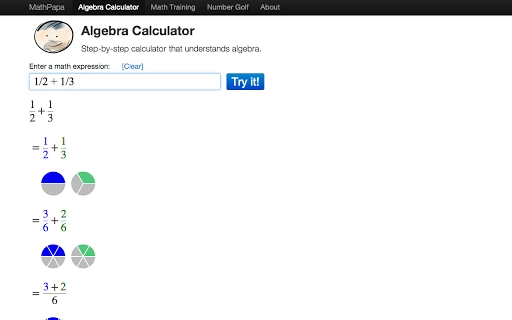
Algebra Calculator is a desktop application designed to assist users in solving algebraic problems with detailed, step-by-step explanations. The software targets students, educators, and professionals who require accurate, transparent solutions to algebraic expressions, equations, and functions. It supports a wide range of mathematical operations, including polynomial manipulation, exponentiation, fraction handling, and graphing of equations. The tool is particularly useful for learning algebraic concepts by showing each computational step, making it ideal for classroom use, homework assistance, and self-paced study. The developer, SoftPas, has positioned the application as a practical utility for users seeking clarity in algebraic problem-solving. Real-world usage scenarios include verifying homework answers, preparing teaching materials, and exploring function behavior through visual graphing. The application runs on both Windows and Mac platforms, offering accessibility across common desktop environments.
Key Features & Capabilities
- Step-by-step problem solving – Provides detailed breakdowns of algebraic operations, helping users understand how solutions are derived rather than just receiving final answers.
- Polynomial simplification and expansion – Handles expressions like
(x+1)(x+2)and applies distributive and factoring rules to simplify or expand them. - Exponent operations – Supports exponentiation using the
^symbol, including expressions such as2^3 * 2^2, with correct application of power rules. - Fraction arithmetic – Performs addition, subtraction, multiplication, and division of fractions, including mixed numbers, with proper simplification.
- Equation solving – Solves linear and basic algebraic equations, such as
4x + 2 = 2(x + 6), showing each transformation step. - Graphing functionality – Visualizes equations like
y = x^2 + 1, enabling users to observe the shape and behavior of functions. - Variable evaluation – Allows substitution of values into expressions, such as
2x^2 + 2yforx=5, y=3, to compute results dynamically.
These features are particularly effective in educational contexts where understanding the process is as important as the result. For example, a student can input a complex expression and review each simplification step to reinforce classroom learning. Similarly, a teacher can use the tool to generate accurate examples for lesson plans. The calculator’s ability to handle multiple operations within a single input stream enhances workflow efficiency, reducing the need for switching between tools.
User Interface, Workflow & Performance
The user interface is designed with clarity and functionality in mind, featuring a clean input area where users can type algebraic expressions using standard mathematical notation. Navigation is straightforward, with minimal on-screen clutter, allowing users to focus on problem entry and solution review. The workflow follows a direct input-to-output pattern: users enter a problem, the software processes it, and displays the solution with annotated steps. The application responds promptly to inputs, indicating efficient internal processing. However, exact performance details such as CPU or RAM usage were not specified by the developer. Stability is assumed to be consistent given the application’s focused scope and modest size of 12.3 MB. No reported crashes or freezes were noted in the available documentation. The developer did not provide additional system requirements, so users should ensure their system meets general desktop software standards. Overall, the workflow supports rapid problem-solving with a low learning curve, making it accessible to users of varying technical skill levels.
Compatibility & System Requirements
Algebra Calculator is compatible with both Windows and Mac operating systems, as stated in the product details. The software version is 1.0, with a file size of 12.3 MB, indicating a lightweight installation. This suggests the application is optimized for minimal system resource consumption. However, exact system requirements such as minimum RAM, processor speed, or specific OS versions were not listed by the developer. Platform compatibility information is limited to the general availability on Windows and Mac. Users should verify that their system supports the installation of desktop applications from third-party developers. The developer did not specify whether the software requires an internet connection or runs entirely offline. Given its nature as a computational tool, it is likely designed for offline use, but this has not been confirmed.
Pros and Cons
Pros
- Provides clear, step-by-step solutions to algebra problems
- Supports a wide range of algebraic operations including polynomials and fractions
- Includes graphing functionality for visualizing equations
- Free to download and use with no hidden costs
- Lightweight at 12.3 MB, suitable for older or low-resource systems
Cons
- Exact system requirements were not specified by the developer
- Performance behavior under heavy use was not documented
- Only basic algebraic functions are supported; no advanced calculus or matrix operations
- No indication of update frequency or future feature roadmap
- Limited to desktop platforms; no mobile or web version available
FAQ Section
Is Algebra Calculator compatible with Windows and Mac?
Yes, the software is designed to run on both Windows and Mac operating systems, as confirmed by the developer.
Is the software free to use?
Yes, Algebra Calculator is available at no cost. There are no subscription fees or in-app purchases required.
Does it require an internet connection?
The developer did not specify whether an internet connection is required. Based on its functionality as a computational tool, it is likely designed to operate offline.
Can I use it for homework and classroom teaching?
Yes, the step-by-step solution feature makes it a suitable tool for students and educators to verify answers and understand algebraic processes.
How often is the software updated?
Information about update frequency was not provided. Users should check the official website for the latest version.
Final Thoughts
Algebra Calculator delivers a focused, reliable solution for users needing step-by-step algebraic assistance. Its ability to simplify expressions, solve equations, evaluate variables, and graph functions makes it a valuable tool in educational and professional settings. The inclusion of detailed solutions enhances learning, while the lightweight design ensures broad accessibility. Although some technical details like system requirements and update schedules are missing, the software functions as intended within its scope. For students seeking clarity in algebra and educators preparing materials, this tool offers practical value. The free price point further strengthens its appeal. With a clean interface and efficient workflow, it stands out among basic algebra utilities.
Download Algebra Calculator now
Guides & Tutorials for Algebra Calculator by MathPapa.com App for Chrome
How to install Algebra Calculator by MathPapa.com App for Chrome
- Click the Preview / Download button above.
- Once redirected, accept the terms and click Install.
- Wait for the Algebra Calculator by MathPapa.com App for Chrome download to finish on your device.
How to use Algebra Calculator by MathPapa.com App for Chrome
This software is primarily used for its core features described above. Open the app after installation to explore its capabilities.
User Reviews for Algebra Calculator by MathPapa.com App for Chrome 0
No reviews found





